Edit any dish
Change prices, names, and descriptions. See the old value next to the new one.
“Change the Cobb Salad to $19.50”
Sous is the AI assistant inside Honeycomb. Type what you want changed, review it, and publish. No spreadsheets, no tickets, no waiting on someone else.
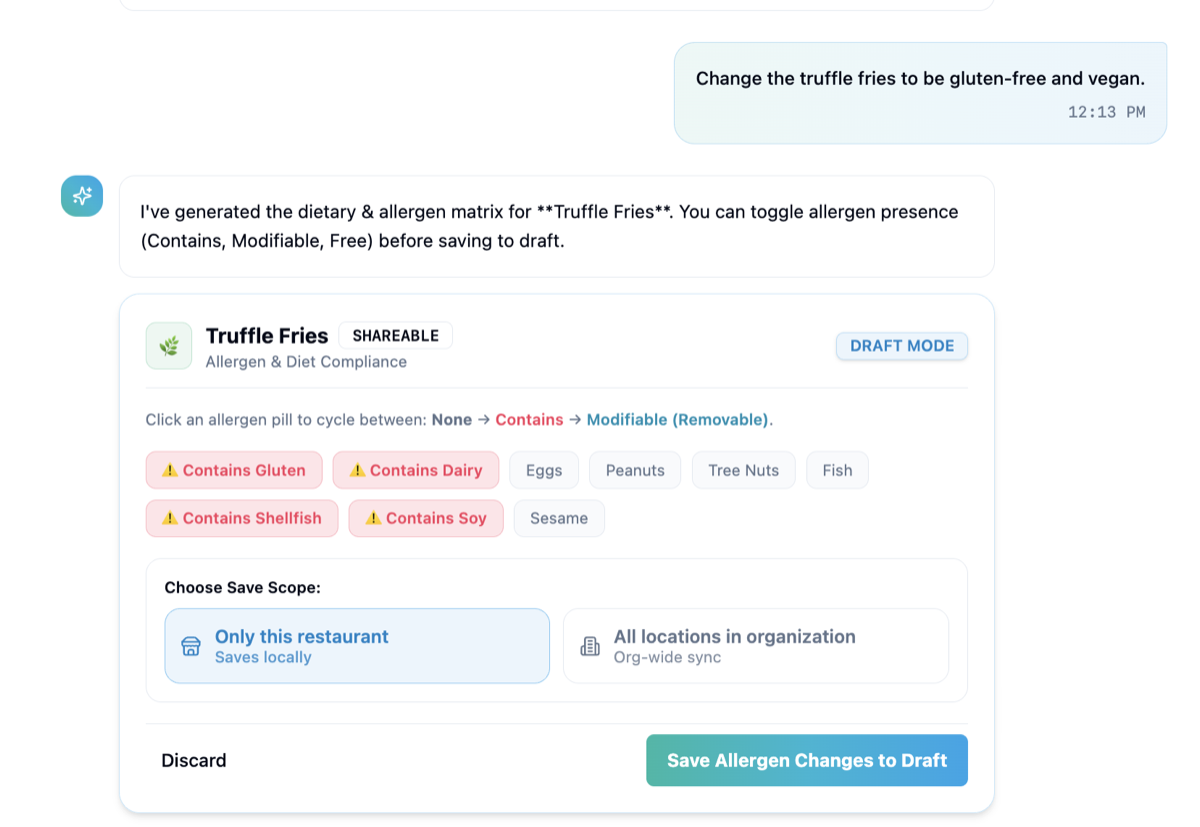
Sous is Honeycomb's AI menu assistant for restaurant groups. You describe a change in plain language, like "make the truffle fries gluten-free and vegan," and Sous prepares it as a draft for you to review. Nothing goes live until you approve it, for one location or all of them.
Type the change the way you would say it to a colleague. Prices, sold-out dishes, allergens, new items, translations.
Sous shows you exactly what will change, with a clear before and after. Edit anything you want to adjust.
Choose this location or every location. Your guests, servers, and guides update together.
Twelve kinds of change, each with its own simple review card. All of them stay drafts until you approve.
Change prices, names, and descriptions. See the old value next to the new one.
“Change the Cobb Salad to $19.50”
The fast 86 for busy shifts. One tap to bring the dish back.
“86 the salmon at Waikiki”
Set Contains, Can be removed, or Free for each allergen, with matching diet badges.
“Make the truffle fries vegan”
Drag your categories into the order guests should see them.
“Put desserts before drinks”
Shift an item to another section at one location or across the group.
“Move the wings to Shareables”
Describe a dish and Sous drafts the entry, including allergen and nutrition estimates.
“Add a seasonal squash soup”
Manage the extras guests can add or remove, with allergens attached.
“Add bacon as a burger add-on”
Publish your menu in more languages without another round of copying files.
“Translate the brunch menu to French”
Apply one change to many dishes at once, then review the whole list.
“Raise every burger by $1”
If a request could mean two dishes, Sous shows you a short list to pick from.
“Which Caesar did you mean?”
A clear summary of every pending change before anything is published.
“Show me what changed today”
Pick the scope for every change. Save locally, or sync across the whole group.
“Only this restaurant, or all locations”
| The old way | With Sous | |
|---|---|---|
| Change a price | Find the file, edit it, send it around, hope everyone updates | Ask once, review, publish |
| Mark a dish vegan | Update the menu, the allergen chart, and the website separately | One request updates all three |
| Update every location | Repeat the work location by location | Choose all locations and publish |
| See what changed | Compare files by eye | A clear before and after on every draft |
| Who can do it | Whoever knows where the files are | Anyone on your team with access |
Sous is the AI menu manager built into Honeycomb. You tell it what to change in everyday language, and it prepares the change for your review. It works on your real menu, so guests, servers, and guides all stay in sync.
No. Every change starts as a draft. You review it and approve it before anything goes live, so you stay in control.
Yes. For each change you choose between one restaurant and all locations in your organization.
Edit prices and descriptions, mark dishes sold out, set allergens and diets, reorder sections, move dishes, add new dishes, manage modifiers, translate menus, and apply batch changes.
Sous is in early access. Book a demo and we will show you what it can do with your own menu, and talk through getting your team started.
Yes. Honeycomb can connect to assistants like ChatGPT, Claude, and Microsoft Copilot so your team can work on the menu from the tool they already use. This is also in early access.
Restaurant chains and multi-location groups that want their operators, not developers, to keep menus accurate.
See it working on your own menu in a short demo.
Sous is a front end for the same Honeycomb menu actions that power the product. Anything it does can also be driven from your own tools.
Developers can start at the API overview or read llms.txt and AGENTS.md.
# Talk to your menu from the terminal
$ hc menu edit earls-waikiki

# Example request
"Change the truffle fries to be gluten-free and vegan."

# Result
Draft ready. Review the allergen matrix, then save to draft.