Allergen filters
Guests choose the allergens to avoid and everything else adjusts around them.
Guests filter by allergen, diet, and calories and see only what works for them. It updates the moment your menu does and works on any phone.
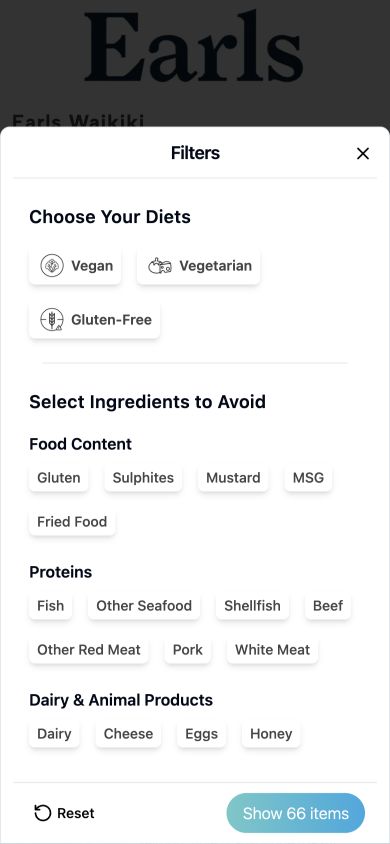
A digital allergen menu lets guests filter your menu by allergens, diets, and calories so they can find dishes that suit them without waiting for a server. Honeycomb's version runs on your website or a shareable link, updates instantly, and can be translated into more languages.
Honeycomb turns your menu into a fast, mobile-friendly page you can link to or add to your website.
They pick their allergens or diet and instantly see the dishes that fit, and which can be modified.
See which filters guests use most, so you can shape a menu that fits your crowd.
Clear, calm, and quick to use, even for a guest standing at the door.
Guests choose the allergens to avoid and everything else adjusts around them.
Vegan, vegetarian, gluten free, dairy free, keto, nut free, and more.
Show calories and macros for each dish, and filter by a calorie range.
Guests see when a dish can be made without an ingredient, not only what it contains.
Offer the menu in more languages for guests and visitors.
Fast to load, easy to share, and installable to the home screen.
| PDF menu | Honeycomb digital menu | |
|---|---|---|
| Finding a safe dish | Ask the server and wait | Filter in a few taps |
| Keeping it current | Re-export and re-upload | Updates the moment you publish |
| Dietary detail | Small print, if any | Allergens, diets, and calories per dish |
| Insight | None | See what guests filter for |
It is an online menu where guests can filter dishes by allergens, diets, and calories to find what suits them.
Yes. It opens in any phone browser from a link or QR code, and can be added to the home screen.
Yes. You can link to it or add it to your site.
Yes. Publish a change and the guest menu updates right away.
Yes. Each menu also has a plain text version that AI assistants can read, so answers about your dishes stay accurate.
Yes. Open the live Earls Waikiki menu to try the filters yourself.
See it working on your own menu in a short demo.
Every restaurant menu is server-rendered, has structured data, and publishes a machine-readable version for AI assistants and agents.
Developers can start at the API overview or read llms.txt and AGENTS.md.
# Machine-readable menu for any restaurant
GET menu.honeycomb.ai/restaurant/earls-waikiki/llms.txt

# Example line
- **Cobb Salad**
  - allergens: High FODMAP, Nightshades
  - nutrition: calories=863, protein_g=23